Lecture – Strings and Characers
Table of Contents
- Lecture – Strings and Characers
- Table of Contents
- ASCII
- char type
- ASCII Character Chart
- Special Characters
- Special Char Example Code
- Character Library
- ctype.h
- Character Input/Output
- Array of char
- Strings in C
- String Output
- Dangerous String Input
- Safer String Input
- C String Library
- String Code
- Simple Encryption
- Arrays of Strings
- gets( ) to read a line
- fgets( ) to read a line
- fgets( )
- Detecting EOF with fgets( )
- Using fgets( ) instead of gets( )
- “Big Enough”
- What can happen?
- Summary
http://www.csee.umbc.edu/courses/pub/www/courses/undergraduate/313/spring12/Lectures/CStrings.ppt
ASCII
-
The American Standard Code for Information Interchange (ASCII) character set, has 128 characters designed to encode the Roman alphabet used in English and other Western European languages.
-
C was designed to work with ASCII and we will only use the ASCII character set in this course. The char data type is used to store ASCII characters in C
-
ASCII can represent 128 characters and is encoded in one eight bit byte with a leading 0. Seven bits can encode numbers 0 to 127. Since integers in the range of 0 to 127 can be stored in 1 byte of space, the sizeof(char) is 1.
-
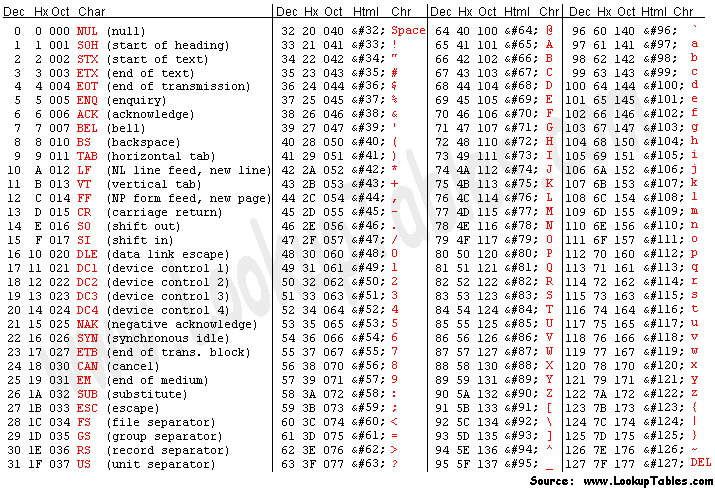
The characters 0 through 31 represent control characters (e.g., line feed, back space), 32-126 are printable characters, and 127 is delete
char type
- C supports the char data type for storing a single character.
- char uses one byte of memory
- char constants are enclosed in single quotes
- char myGrade = ‘A’;
ASCII Character Chart
Special Characters
- The backslash character, , is used to indicate that the char that follows has special meaning. E.g. for unprintable characters and special characters.
- For example
\nis the newline character\tis the tab character\"is the double quote (necessary since double quotes
are used to enclose strings\'is the single quote (necessary since single quotes are
used to enclose chars\\is the backslash (necessary since \ now has special
meaning\ais beep which is unprintable
Special Char Example Code
printf(“\t\tMove over\n\nWorld, here I come\n");
        Move over

World, here I come
printf("I’ve written \”Hello World\”\n\t many times\n\a“);
I’ve written "Hello World"
    many times <beep>
Character Library
- There are many functions to handle characters.
- #include <ctype.h> - library of functions
- Note that the function parameter type is int, not char. Why is this ok?
- Note that the return type for some functions is int since ANSI C does not support the bool data type. Recall that zero is “false”, non-zero is “true”.
- A few of the commonly used functions are listed on the next slide. For a full list of ctype.h functions, type man ctype.h at the unix prompt.
ctype.h
int isdigit (int c);- Determine if c is a decimal digit (‘0’ - ‘9’)
int isxdigit(int c);- Determines if c is a hexadecimal digit (‘0’ - ’9’, ‘a’ - f’, or ‘A’ - ‘F’)
int isalpha (int c);- Determines if c is an alphabetic character (‘a’ - ‘z’ or ‘A- ‘Z’)
int isspace (int c);- Determines if c is a whitespace character (space, tab, etc)
int isprint (int c);- Determines if c is a printable character
int tolower (int c);int toupper (int c);- Returns c changed to lower- or upper-case respectively, if possible
Character Input/Output
- Use
%cinprintf()andfprintf()to output a single character.char yourGrade = 'A';printf( “Your grade is %c\n”, yourGrade);
- Can input char(s) using %c with scanf( ) or fscanf( )
char grade, scores[3];%cinputs the next character, which may be whitespacescanf(“%c”, &grade);
Array of char
- An array of chars may be (partially) initialized.
This declaration reserves 20 char (bytes) of memory, but only the first 5 are initializedchar name2 [ 20 ] = { ‘B’, ‘o’, ‘b’, ‘b’, ‘y’ };
- You can let the compiler count the chars for you. This declaration allocates and initializes exactly
5 chars (bytes) of memory:char name3 [ ] = { ‘B’, ‘o’, ‘b’, ‘b’, ‘y’ };
- Just having an array of chars is NOT sufficient to form a C-style null-terminated string
Strings in C
- In C, a string is an array of characters terminated with the “null” character (‘\0’, value = 0, see ASCII chart).
- A string may be defined as a char array by initializing the last char to ‘\0’
- char name4[ 20 ] = {‘B’, ‘o’, ‘b’, ‘b’, ‘y’, ‘\0’ };
- Char arrays are permitted a special initialization using a string constant. Note that the size of the array must account for the ‘\0’ character.
- char name5[6] = “Bobby”; // this is NOT assignment
- Or let the compiler count the chars and allocate the appropriate array size
- char name6[ ] = “Bobby”;
- All string constants are enclosed in double quotes and include the terminating ‘\0 character
String Output
- Use %s in printf( ) or fprintf( ) to print a string. All chars will be output until the ‘\0’ character is seen.
- char name[ ] = “Bobby Smith”;
- printf( “My name is %s\n”, name);
- As with all conversion specifications, a minimum field width and justification may be specified
- char book1[ ] = “Flatland”;
- char book2[ ] = “Brave New World”;
- printf (“My favorite books are %12s and %12s\n”, book1, book2);
- printf (“My favorite books are %-12s and %-12s\n”, book1, book2);
Dangerous String Input
- The most common and most dangerous method to get string input from the user is to use %s with scanf( ) or fscanf( )
- This method interprets the next set of consecutive nonwhitespace characters as a string, stores it in the specified char array, and appends a terminating ‘\0’ character.
- char name[22];
- printf(“ Enter your name: “);
- scanf( “%s”, name);
- Why is this dangerous?
- See scanfString.c and fscanfStrings.c
Safer String Input
- A safer method of string input is to use %ns with scanf( ) or fscanf( ) where n is an integer
- This will interpret the next set of consecutive non-whitespace characters up to a maximum of n characters as a string, store it in the specified char array, and append a terminating ‘\0’ character.
- char name[ 22 ];
- printf( “Enter your name: “);
- scanf(“%21s”, name); // note 21, not 22
C String Library
- C provides a library of string functions.
- To use the string functions, include <string.h>.
- Some of the more common functions are listed here on the next slides.
- To see all the string functions, type man string.h at the unix prompt.
- Commonly used string functions
- These functions look for the ‘\0’ character to determine the end and size of the string
- strlen( const char string[ ] )
- Returns the number of characters in the string, not including the “null” character
- strcpy( char s1[ ], const char s2[ ] )
- Copies s2 on top of s1.
- The order of the parameters mimics the assignment operator
- strcmp ( const char s1[ ] , const char s2[ ] )
- Returns < 0, 0, > 0 if s1 < s2, s1 == s2 or s1 > s2 lexigraphically
- strcat( char s1[ ] , const char s2[ ])
- Appends (concatenates) s2 to s1
- strlen( const char string[ ] )
- Some function in the C String library have an additional size parameter.
- strncpy( char s1[ ], const char s2[ ], int n )
- Copies at most n characters of s2 on top of s1.
- The order of the parameters mimics the assignment operator
- strncmp ( const char s1[ ] , const char s2[ ], int n )
- Compares up to n characters of s1 with s2
- Returns < 0, 0, > 0 if s1 < s2, s1 == s2 or s1 > s2 lexigraphically
- strncat( char s1[ ], const char s2[ ] , int n)
- Appends at most n characters of s2 to s1
- strncpy( char s1[ ], const char s2[ ], int n )
String Code
char first[10] = “bobby”;
char last[15] = “smith”;
char name[30];
char you[ ] = “bobo”;
strcpy( name, first );
strcat( name, last );
printf( “%d, %s\n”, strlen(name), name );
strncpy( name, last, 2 );
printf( “%d, %s\n”, strlen(name), name );
int result = strcmp( you, first );
result = strncmp( you, first, 3 );
strcat( first, last );
Simple Encryption
char c, msg[] = "this is a secret message";
int i = 0;
char code[26] = /* Initialize our encryption code */
{'t','f','h','x','q','j','e','m','u','p','i','d','c',
'k','v','b','a','o','l','r','z','w','g','n','s','y'} ;
/* Print the original phrase */
printf ("Original phrase: %s\n", msg);
/* Encrypt */
while( msg[i] != '\0‘ ){
  if( isalpha( msg[ i ] ) ) {
    c = tolower( msg[ i ] ) ;
    msg[ i ] = code[ c - ‘a’ ] ;
  }
  ++i;
}
printf("Encrypted: %s\n", msg ) ;
Arrays of Strings
- Since strings are arrays themselves, using an array of strings can be a little tricky
- An initialized array of string constants
char months[ ][ 10 ] = {
“Jan”, “Feb”, “March”, “April”, “May”, “June”,
“July”, “Aug”, “Sept”, “Oct”, “Nov”, “Dec”
};
int m;
for ( m = 0; m < 12; m++ )
printf( “%s\n”, months[ m ] );
- An array of 12 string variables, each 20 chars long
char names[ 12 ] [ 21 ];
int n;
for( n = 0; n < 12; ++n )
{
printf( “Please enter your name: “ );
scanf( “%20s”, names[ n ] );
}
gets( ) to read a line
- The gets( ) function is used to read a line of input (including the whitespace) from stdin until the \n character is encountered. The \n character is replaced with the terminating \0 character.
#include <stdio.h>
char myString[ 101 ];
gets( myString );
- Why is this dangerous?
- See gets.c
fgets( ) to read a line
- The fgets( ) function is used to read a line of
input (including the whitespace) from the
specified FILE until the \n character is
encountered or until the specified number of
chars is read. - See fgets.c
fgets( )
#include <stdio.h>
#include <stdlib.h> /* exit */
int main ( )
{
double x ;
FILE *ifp ;
char myLine[42 ]; /* for terminating \0 */
ifp = fopen("test_data.dat", "r");
if (ifp == NULL) {
  printf ("Error opening test_data.dat\n");
  exit (-1);
}
fgets(myLine, 42, ifp ); /* read up to 41 chars*/
fclose(ifp); /* close the file when finished */
/* check to see what you read */
printf(”myLine = %s\n”, myLine);
return 0;
}
Detecting EOF with fgets( )
- fgets( ) returns the memory address in which the line was
stored (the char array provided). However, when fgets( )
encounters EOF, the special value NULL is returned.
FILE *inFile;
inFile = fopen( “myfile”, “r” );
/* check that the file was opened */
char string[120];
while ( fgets(string, 120, inFile ) != NULL )
printf( “%s\n”, string );
fclose( inFile );
Using fgets( ) instead of gets( )
- Since fgets( ) can read any file, it can be used in
place of gets( ) to get input from the user- #include <stdio.h>
- char myString[ 101 ];
- Instead of
- gets( myString );
- Use
- fgets( mystring, 100, stdin );
“Big Enough”
- The “owner” of a string is responsible for allocating array space which is “big enough” to store the string (including the null character).
- scanf( ), fscanf( ), and gets( ) assume the char array argument is “big enough”
- String functions that do not provide a parameter for the length rely on the ‘\0’ character to determine the end of the string.
- Most string library functions do not check the size of the string memory. E.g. strcpy
- See strings.c
What can happen?
#include <stdio.h>
int main( )
{
  char first[10] = "bobby";
  char last[15] = "smith";
  printf("first contains %d chars: %s\n", strlen(first), first);
  printf("last contains %d chars: %s\n", strlen(last), last);
  strcpy(first, "12345678901234567890"); /* too big */
  printf("first contains %d chars: %s\n", strlen(first), first);
  printf("last contains %d chars: %s\n", strlen(last), last);
  return 0;
}
gcc -fno-stack-protector segfault.c
./a.out
first contains 5 chars: bobby
last contains 5 chars: smith
first contains 20 chars: 12345678901234567890
last contains 5 chars: smith
Segmentation fault (core dumped)
Summary
- Avoid
scanf( “%s”, buffer); - Use
scanf(“%100s”, buffer);instead - Avoid
gets( );since it can also suffer from buffer overrun - Use
fgets(..., ..., stdin);instead ofsprintf( ); - Sometimes it’s necessary to format a string in an array of chars. Something akin to toString( ) in Java.
sprintf( )works just likeprintf( )orfprintf( ), but puts its "output" into the specified character array.- As always, the character array must be big enough.
- See sprintf.c
char message[ 100 ];int myAge = 4;sprintf( message, “I am %d years old\n”, age);printf( “%s\n”, message);
avoid gets
Excerpt fom Linux manpage for gets warns against its usage
man gets
reports:
Never use gets(). Because it is impossible to tell without knowing the data in advance how many characters gets() will read, and because
gets() will continue to store characters past the end of the buffer, it is extremely dangerous to use. It has been used to break computer
security. Use fgets() instead.
Use length-limiting functions like fgets
fgets allows for a SIZE LIMIT to avoid buffer overruns.
It returns a pointer to the written array on success, or NULL if either EOF is detected or no character is read
char *fgets(char *s, int size, FILE *stream);