Lecture – Communications

Table of Contents
- Lecture – Communications
- Table of Contents
- References
- Wired Communications
- Parallel or Serial
- Parallel Example: Off-chip RAM
- Wait States for Interfaces
- Handshaking
- Handshaking with Parallel Interface
- Bit banging
- Tristate Signals
- Common Serial Interfaces
- RS232 + UART
- UART Universal Asynchronous Receiver Transmitter Buffer
- SPI
- I2C
- CAN
- CAN Arbitration Example
- USB
- Review
- Slide Changes
References
- †James K. Peckol : Embedded Systems: A Contemporary Design Tool, Wiley https://www.wiley.com/en-us/Embedded+Systems%3A+A+Contemporary+Design+Tool%2C+2nd+Edition-p-9781119457558
Wired Communications
-
The goal is to allow discrete devices to communicate with
each other through hardware connections, for
communicating data sets or for synchronization. We will
only consider wired connections rather than wireless ones. -
Common Types of signals/wires
- Data signals
- Clock
- Control Signals
- Address signals
-
Tri-state signals are common where lines will be driven by
multiple devices (e.g. for bi-directional data lines or multiple
slaves or masters)
Parallel or Serial
- First fundamental distinction is parallel or serial
- Serial approach opts for fewer wires
- bits interpreted by order
- Parallel achieves higher throughput for same frequencies by using more wires
- bit are interpreted by wire position
Novice user note: Parallel can be easier to debug by hand if system
can be paused and there are a few states to step through. But,
dealing with so many wires can be cumbersome and can increase
size and cost of system.
Parallel Example: Off-chip RAM
-
Memory ICs are one of the most common parallel-interface devices.
-
Some microcontrollers or embedded processes require external RAM, some others support it. Most RAM interfaces are similar.
-
Here is an example from the ATMega128 datasheet:
- If the external RAM interface is enabled, it uses up some of the I/O pins and enables the use of more memory.
- The interface uses some of the I/O pins and consists of:
- AD7:0: Multiplexed low-order address bus and data bus.
- A15:8: High-order address bus (configurable number of bits).
- ALE: Address latch enable.
- RD: Read strobe.
- WR: Write strobe.

image source: AVR Datasheet -
The compiler settings must be adjusted for it to utilize the RAM.
-
Extended RAM becomes available to the application
- mapped to higher address space and is natively handled by the linker once configured correctly

image source: AVR Datasheet
Wait States for Interfaces
-
The memory interface relies on guaranteed timing rather than handshaking signals.
-
Our AVR chip supports configuring a small number of wait states to slow the interface to the external RAM;
- common feature among microcontrollers and other configurable hardware
-
Master devices may support much longer wait states

image source: AVR Datasheetwith wait states:

image source: AVR Datasheet
Handshaking
-
Previous interface protocol built with assumption of guaranteed timing by slave device
-
Handshaking allows devices to operate with slaves of unknown latencies
- slave device can reply when it is ready, using an additional signal
- Commonly, a signal serves as both and
-
Handshaking can be performed by Hardware or Software
-
Handshaking supports request-dependant and state-dependant latency
- Example: accessing a different element in a row of memory vs. in another page
Handshaking with Parallel Interface
Example:
ADC: ADS8412 https://www.ti.com/lit/ds/symlink/ads8412.pdf

https://www.ti.com/lit/ds/symlink/ads8412.pdf

https://www.ti.com/lit/ds/symlink/ads8412.pdf
Pseudocode:
- configure external interrupt for falling-edge response (denoted as )
- set
CS_n=lowandRD_n=low - initialize busy:
BUSY = low - start conversion:
CONVST_n = low - wait
BUSY == high - set
CONVST_n==high - if polling, wait
BUSY==low, else wait for signal from falling-edge-triggered interrupt - read
MSBfrom data pins - set
BYTE=high - read
LSBfrom data pins - set
BYTE=low - goto start conversion to repeat
Bit banging
- Hardware interfacing uses less CPU resources and is often faster but it is less flexible, so it may not be a compatible option for the part you have chosen.
- If hardware support is not available, can purely software interface
- Bit banging: Use software to implement entire protocol (or perhaps a some of it) typically with GPIO
- Software interfacing is very flexible, but it may be slower and uses more CPU resources and occupies general I/O pins (GPIO).
Tristate Signals
- To minimize pin usage, tristate interfaces (particularly on address and/or data bus) are common
- On slave device ask if it has a tri-state or bi-directional bus interface and how is the tri-stating controlled. Many times use of the feature is optional.
- For novice, tristate interfaces are less trivial to design for and more difficult to debug
- Difficult to diagnose misbehavior
- A device not driving the bus when it should simple leaves the bus "floating or undriven" , which may or may not manifest as erroneous data at a given instant
- A device driving the bus when it shouldn't may or may not be in conflict with another device, and finding which device is misbehaving isn't always trivial
- If pull-up resistance required, must choose pull-resistance
- Higher resistance consumes less power during pull-down but slows transition (maximum resistance will be noted by datasheets)
- Difficult to diagnose misbehavior
- Commonly a chip enable signal, chip select (CS), or output enable signal controls bus drivers in the slave
- Most microcontrollers support tristate in GPIO
Common Serial Interfaces
- RS232
- Host-Slave, supports point-to-point
- connection using as few as 2 two signals and ground
- one data line dedicated for send
- one data line dedicated for receive
- Well-known
- Simple interface, though transceiver IC often required for voltage conversion
- Allows 10s of feet distance unless special low-capacitance cables are used
- Cost effective
- High-data rates not universally available, typically around 200kbits/sec or 1Mbit/sec
- Connectors defined in standard
- RS485
- This is supports communications among many devices
- use differential pair, with bidirectional end-points that read and send data on the pair
- Packet Framing similar to RS232
- SPI
- Single Master with multi Slave (use select lines, which uses
more pins than others) - minimum 4 signals for bidirectional communication
- (3+n where n is the number of devices)
- 1 chip select (CS) line per slave
- 1 serial out
- 1 serial data in if using tristate enabled by (CS) or 1 per slave
- 1 serial clock
- (3+n where n is the number of devices)
- Full-Duplex, Fast (no define speed or number of bits)
- Less defined spec means not all devices work together and no standard error-checking or other elements of a communication protocol
- Simpler interface circuitry than most others
- Single Master with multi Slave (use select lines, which uses
- I2C (Inter-Integrated Circuit)
- Multi-master, multi-slave (uses addresses)
- Minimal wiring interface: two signal wires
- clock: SCL
- serial data: SDA
- 100 kb/s standard, 400kbit/s fast, 3.4Mbit/s high-speed
- 5V interface
- Well defined standard allows universal operability (though no connectors are defined)
- CAN (Controller Area Network)
- multi-point interface that is popular in the automotive industry and designed for noisy environments
- like I2C: multi-master, uses addresses
- communication via a differential pair
- reliability with good speed is key concern
- defines additional behavior for contention (when multiple senders attempt to use bus) and arbitration, as well as error handling, and message sending protocol layers
- CAN vs RS485
- USB (Universal Serial Bus)
- master-slave interface
- One master, multiple hubs and devices
- displaced RS232 on desktop computers with much higher speeds
- differential signaling (wire pair)
- Common, but a few different standards exist
- Support hardware built into some microcontrollers, simple usb-to-serial chips available to interface with microcontroller uarts, as well as usb-to-parallel ICs/cables
- Uses addresses
- Standards exceeding Gbit/sec
- Defines supplied power to devices 5V,1/2A (except USB
"On The Go" allows 0 and 1.8A) - Defines connectors
- differential-signaling for noise rejection
- Guaranteed packet delivery to application
- Significant overhead, so not efficient
- USB is Hot plugable (can plug in devices with power on and systems running)
- master-slave interface
- FIREWIRE
- Peer-to-peer tree network
- Designed for standalone devices with more capability than some USB devices
- Was common for video equipment
- Allowance for very long cables (100 meters), differential-signaling for noise rejection
- Some implementations of the connector with power allow 8-30V,1A over-the-line
- Minimal licensing fee
- Standards exceeding Gbit/sec, guaranteed bandwidth
- Lower-overhead, simpler interfacing than USB allows better efficiency and less load on CPU than USB
- With newer USB standards usage is less
- Ethernet
- high speeds but requires complex special hardware ICs for support and a considerable software overhead
RS232 + UART
-
designed to run 10 tens of feet using up to 25V
Data Voltage 0 +3 to +15 V 1 -15 to -3 V

-
common preset BAUD rates: 110, 300, 1200, 2400, 4800, 9600, 19200, 38400, 57600, or 115200
-
baud rate, #start and stops bits, #data bits is configurable and is configured on both ends
-
supports direct peer-to-peer communication between endpoints, though originally intended to connect end-point devices to networked data transceivers

image source: https://en.wikipedia.org/wiki/RS-232 Public Domain -
Signals
- ground
- data (+1 or +2)
- +1 for one-direction of communication one wire (TXD or RXD)
- +2 for bidirectional communications, TXD and RXD are required
- hardware flow control (optional)
- +2 for hardware flow control RTS and CTS lines are required
Pin Signal Name Direction (DTE (Master) <- / -> DCE (Slave)) CD (Carrier Detect) <- RXD (Receive Data) <- TXD (Transmit Data) -> DTR (Data Terminal Ready) -> GND (System Ground) DSR (Data Set Ready) <- RTS (Request To Send) -> CTS (Clear To Send) <- RI (Ring Indicator) ->
Data Packet Framing using Start and Stop bits
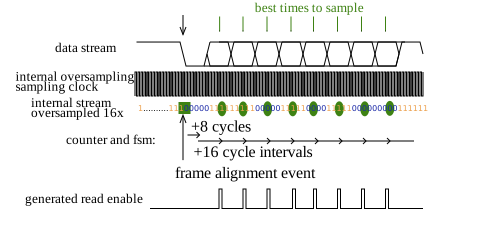
- Framing defines the start and end of packets of data in EIA232 standing, a Start Bita and Stop Bit Are Used is RS232
-
start bit: provides transition from high-to-low for frame alignment
-
baud rate: determines interval between bits (bit rate)
-
stop bit: ensures return to high regardless of final bit to facilitate next alignment event (configurable rest interval between packets, stop bit length can be 1,1.5, or 2)
-
word-length: typically 8 data bits are sent, though can be 9
-
parity bit: optional, can be added at end of data packet before stop bit for error detection
-
Receiver Operation
- Receiver operates on a clock faster than the baud-rate, typically at least 16x
- may be referred to as the bit timer (CMPE311 course book)
- receiver oversamples the input stream
- the start bit provides an alignment event
- a counter is used to generate read-enable signals ideally in the middle of valid data bits. Requires a known relationship between the sample clock and the baud-rate
- Receiver operates on a clock faster than the baud-rate, typically at least 16x
Interface
- Historically, the connector is "male" for DTE (master) equipment and "female" for DCE equipment (slave). RS232 DB9 pin D-SUB male connector
- There are two forms of handshaking – software and hardware, to manage sending. Enable the devices to communicate when they are ready for data
- Software handshaking (also called XON/XOFF) uses control characters in the byte stream to signal the halting and resuming of data transmission. Control-S (ASCII 19) signals the other device to stop sending data. Control-Q (ASCII 17) signals the other device to resume sending data. The disadvantage with this approach is that the response time is slower and two characters in the ASCII character set must be reserved for handshaking use.
- Hardware handshaking uses additional I/O lines.
- The most common form of hardware handshaking is to use two additional control wires called RTS (Ready to Send) and CTS (Clear to Send).
- One line is controlled by each device.
- The line (either RTS or CTS) is asserted when bytes can be received and unasserted otherwise.
- These two handshaking lines are used to prevent buffer overruns.
- There are two other less commonly used lines – DTS (Data Terminal Ready) and DSR (Data Set
Ready).- typically used by devices signaling to each other that they are powered up and ready to communicate.
- To summarize, RTS/CTS are used for buffer control and DTS/DSR are used for device present and working indicators. In practice, serial communication with no handshaking uses 3 wires (TX, RX and GND). Serial communications with basic hardware handshaking uses 5 wires (TX, RX, RTS, CTS and GND).
Bit Slippage and Clock Drift
-
Why are the packets limited in length?
- Answer: because there is no shared clock, data signal is used to re-sync but sync is lost over time
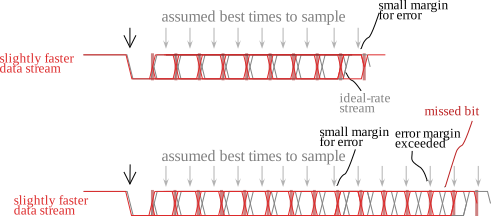

- Bit Slippage (loss of bit or sampling bit twice) occurs when clocks of either the transmitter or receiver are not well-matched (or system cannot account for the mismatch)
- Packets are limited in length (e.g. 8 data bits) so as to avoid bit slippage towards end of packet
Alignment worsens longer after the alignment event, packets are limited in length.
UART Universal Asynchronous Receiver Transmitter Buffer
- Commonly a byte/word buffer is available
- load new data from application while previous word is sent
- hold received data while new word is received
- on our AVR, only one-byte RX and one byte TX
- a driver MAY implement a software buffer that presents a buffered interface to an application
- Framing and Serialization are performed by the sender to transmit bit serially
-
RXD and TXD are mostly independent unless software flow control is used
SPI
-
4 Signals: (or 3+n where n is the number of devices)
-
SCLK : Serial Clock
-
SDI : Data In (master requires one data in for every slave data out)
-
SDO : Data Out (sometimes master DO can be shared, if multiple Sync(CS) signals are used)
-
CS/Sync - Chip Select/Sync Frames data, may also serve as CS so data lines can be shared.
- Master device controls Sync.
-
commonly used for tens of Mbits per second and even faster.
-
Typical two frame operation:


https://www.analog.com/media/en/technical-documentation/data-sheets/AD5371.pdf -
SPI is not exactly the same on every device, polarities of the sync/select and clock, timing, word length and other factor will vary.
-
Some USB-SPI allow computer programs to interface with SPI parts, obviously these devices require many configurable parameters.
I2C
-
Around 400 Kbits/sec originally, but faster versions have been defined (12MHz for version 4.0)
-
Intended to serve as universal communication interface. Spec included limit of 400pF load, but does not specify physical
connections (plugs and sockets) otherwise. -
Reference: http://www.nxp.com/documents/application_note/AN10216.pdf
-

http://www.nxp.com/documents/application_note/AN10216.pdf -
Example illustration indicates 3 configurable address bits
-
-
Only two lines:
- SCL - serial clock
- SCD - serial data
- Uses "wired and" to allow many devices to share a line.


-
References:
- I2C Communication Procedure: http://www.nxp.com/documents/application_note/AN10216.pdf
- Understanding I2C interface: https://www.ti.com/lit/an/slva704/slva704.pdf
-
Masters are the devices that have the ability to initiate transfers
-
master wait until no activity seen on the i2c bus, i.e. SDA and SCL are both high and the bus is 'free'
- when the bus is free the master will place a message on the bus to claim it
-
The start is signaled when the master causes the SDA line to fall while SCL is in the high state.
- START CONDITION: A high-to-low transition on the SDA line while the SCL is high defines a START condition.
-
listening devices will look for their address
- A[5:3] might serve as the category and and A[2:0] can serve as the identifier
-
The slave address is sent be the master follows, with data sampled when the SCL signal goes high
-
Then a R/W_n bit is sent by the master
-
ACK: The slave should then acknowledge pulling the SDA line low (all data sent in I2C is acknowledged)
- ACK extension allows the receiver to hold the clock line low after an ack to delay the sender from proceeding
-
Data and ACK (9-th bit)
- If master is writing, 8 bits are sent with the clock and on the 9th bit position the slave acknowledges
- If master is reading, the slave sends 8 bits and the master must send the acknowledge.
-
Data and ACK may be repeated
-
After one or more send data-cycles or one or more receive cycles, the master releases the SDA and SCL line
...unless it wish to initiate another start to immediately communicate with another device- STOP condition: SCL is high followed by low-to-high transition on the SDA line
Illustration with two-phase: address and one data packet
Contention
Cleverness in the monitoring of lines while they are intended to be controlled
-
Contention Detection and Arbitration - if two masters initiate a transfer arbitration may be needed and it is handled in the following way: if a master is transmitting a one (line is released) and it detects the line is being pulled low, it knows another master is working with the line and it aborts. Notice the master that has the SDA line released (higher address/data) is considered to have lost the arbitration.
-
When contention and abort happens, no data is lost (SEE CAN EXAMPLE!)
-
Synchronization and Clock Stretching
- Clock stretching: a slave may hold down SCL to slow the bus
- when a master lowers the SCL line, all other masters follow by lowering their lines. Then each master eventually passes its low period and releases the clock line. Since the master only proceeds after the clock line goes high, that starts the high cycle. In this way, the slowest master can control the speed of the system. (You may note that the low period is controlled by the device with the longest low period and the high time is control by the device with the shortest high internal.)
-
Upcoming Update I3C: https://en.wikipedia.org/wiki/I3C_(bus)
See CAN section of notes for Contention and Arbitration Example
CAN
-
Network
- Supports many devices, peer-to-peer, with multiple masters that may drive the bus
-

Image Credit: EE JRW under CC License https://creativecommons.org/licenses/by-sa/4.0/
-
Differential Signaling
- Just two signal wires
- Theoretically, a common ground amoung devices may not be required, but can use available ground reference like car frame
- Two signal states: dominant and recessive
- Dominant must be able to override recessive
- Low Speed:
-
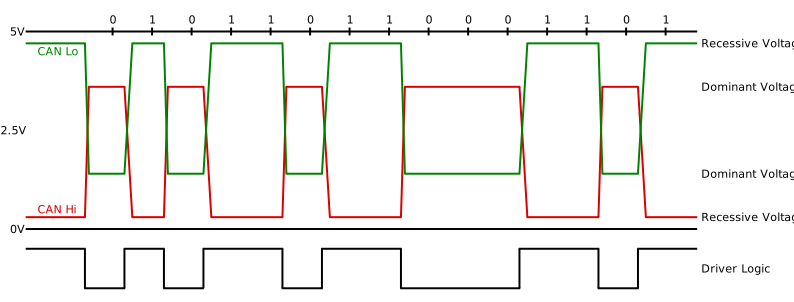
Image Credit: EE JRW under CC License https://creativecommons.org/licenses/by-sa/4.0/ - High-Speed:
-

Image Credit: EE JRW under CC License https://creativecommons.org/licenses/by-sa/4.0/
-
CAN defines multiple layers for communication: physical layer, data link layer, and others implemented in software
- Physical layer specification typically requires special hardware not provided on microcontroller
-
Arbitration (like i2c !)
- Relies on drive and monitor
- A dominant state detected during attempt to signal recessive results in abort by the sender
- contention causes no loss of data on abort
- naturally, lower value transmission wins
- aborting devices can try resend at later time
- may use random and increasing backoff with each contention
CAN Arbitration Example
- like i2c, using try-to-drive and monitor
- No loss of data, eventually all but one sender must abort
- lower logic values win
| Startbit | ID bits | The rest of the frame | |||||||||||
|---|---|---|---|---|---|---|---|---|---|---|---|---|---|
| 10 | 9 | 8 | 7 | 6 | 5 | 4 | 3 | 2 | 1 | 0 | |||
| Node 15 | 0 | 0 | 0 | 0 | 0 | 0 | 0 | 1 | 1 | 1 | 1 | ||
| Node 16 | 0 | 0 | 0 | 0 | 0 | 0 | 0 | Stopped Transmitting | |||||
| CAN data | 0 | 0 | 0 | 0 | 0 | 0 | 0 | 1 | 1 | 1 | 1 |
Table Source: https://en.wikipedia.org/wiki/CAN_bus Provided under Creative Commons Attribution-ShareAlike 3.0 Unported License https://en.wikipedia.org/wiki/Wikipedia:Text_of_Creative_Commons_Attribution-ShareAlike_3.0_Unported_License
USB
- One host allows several hubs and endpoint devices
- Devices are hot plug-able (can plug in devices with power on and systems running)
- USB baseline operation assumes guaranteed timing and protocol attempts to provide guaranteed delivery
- so not suitable for noisy physical connections, requires high-quality physical connection
- Its communication involves sending packets of synchronization, id, data, crc, and end of packet.
- Device is a collection of interfaces
- Interface is a collection of endpoints
- Endpoints associated with FIFOs
- HUB allows expansion, with ability to introduce additional power source (powered Hub)
Logical
- Three phases to communication are defined:
- (1) Token packet phase specifies communication type to take place, may include address
- (2) Data packet contains payload up to 1023 bytes
- (3) Handshake packet (e.g. ACK)
- Packets
More details on packets: https://www.beyondlogic.org/usbnutshell/usb3.shtml
also, https://www.usbmadesimple.co.uk/- Data Packet
- Lead by Sync
- for clock generator on receiver to synchronizer
- 8 or 32 bits low 0's depending on speed, followed by 1's
- Packet ID
- type of packet, affects size of data
- Packet Data
- CRC - 16 bit error correction code
- EOP - special signaling: both lines pulled low for approximately two bit times then differential 1
- Lead by Sync
- Data Packet
Physical Signals
- USB uses differential signals (pairs of lines always kept in opposite states), called D+ and D-.
- The state, 1 or 0, is interpreted from the difference of the two lines rather than referencing the
lines to ground. If there is noise on ground or both of the signals, it effectively cancels itself. - Differential signaling increases noise margins, prevents radiation, and prevents picking up noise.
- special signaling: both lines pulled low, known as signal-ended zero, for EOP
- The state, 1 or 0, is interpreted from the difference of the two lines rather than referencing the
- Furthermore, no clock is used. It relies on the timing of transitions on the signal lines instead
- Two techniques are applied to done to help ensure many transitions for keeping sync: Non-Return to Zero Inverted and Bit stuffing
- sender must have bit stuffing to insert a 0 after six consecutive 1s and NRZI encoder
- receiver uses NRZI decoder and then throws away 0s six consecutive 1s
Non-Return to Zero Inverted and Bit stuffing
Non-Return to Zero Inverted (NRZI) scheme - 0 encoded as transition and 1 encoded as non-transition
Bit stuffing - if six ones are encountered, a "dummy" zero is sent
USB Device detection
- device detection by pull-up resistors
- Devices provide pull-up resistors to indicate their presence. It is placed on the D+ line to indicate a high-speed 2.0 device and on D- to indicate a low-speed device.

†James K. Peckol
Barrier to entry using USB
- Several microcontrollers have built-in USB capability, otherwise you will need to use an external IC.
- If it is an in-built peripheral for the microcontroller, template code should be provided to send data and handle incoming data using interrupts or polling.
- USB communications distinguish between host mode and slave mode.
- Need to make sure that the mode desired is supported by the microcontroller
- FTDI and other companies provide USB-to-serial and USB to parallel ICs.
- FTDI provides windows drivers to communicate with the ICs. You can use their provided c libraries with the full speed driver or
- virtual com port driver allows any program to communicate with the device as if it is a native com port
Review
Slide Changes
These notes were added Aug 2022:

## Common Serial Interfaces
* CAN
  * like I2C: multi-master, uses addresses
## CAN
,with multiple masters that may drive the bus