Lecture – Timers and Counters
Hardware Timing, Counters
Table of Contents
- Lecture – Timers and Counters
- Table of Contents
- References
- What are Timers/Counters
- Timer/Counter Components
- A timer is built from a counter
- Timer Hardware
- Capture Registers: High-Precision Event Timestamps
- Compare Match Registers
- Timer Behaviors
- Event Counters
- AVR Timer/Counter Modes
- AVR Counter Hardware
- Normal Mode
- Clear Timer on Compare Match (CTC) Mode
- CTC Mode with Output Toggle (frequency modulation)
- Pulse width modulation
- Pulse Width Modulation and Frequency Modulation
- Fast PWM
- Phase Correct PWM Mode
- AVR 16-Bit Timers
- Timer Counter 0 and 1
- Counter Modes Summary
- Hardware Buffering for Multi-word Software-Hardware Read and Writes
- Hybird Hardare-Software Timers
- Extending Timer Through Software Using Overflow Bit
- System Tick and Software Timers
- Multiple Hybrid Hardware/Software timers with dynamic updates for next event
- ACHIEVABLE hardware timing
- Base derivative calculations on the Actual/Achieved Frequency, not the Desired Frequency
- "Leap Cycles for Leap Ticks" Slip Adjustment to Compensate for Error Accumulation
References
What are Timers/Counters
- Hardware provided module which counts
- Counters count events related to signal change
- Timers count clock cycles
- Counts up to threshold then sets interrupt flag
- CPU can poll for interrupt flag – software polling
- CPU can be interrupted by flag – interrupt driven
Timer/Counter Components
- Clock Pre-scaler (divider)
- Clock source selection
- internal clock, external clk, prescaler outputs
- N-bit timer/counter – actual count value
- register size is commonly larger than the native platform
- Compare registers
- for hardware detection of specified counter value
- Capture registers – for precise capture of time of event
- Control Logic
- Status/Control Registers – Defines behavior
A timer is built from a counter
- Event counter -- a counter can count events from an external signal
- Timer -- a counter the increments simply based on a clock signal is a timer
- They will share a core register (T/C)
Timer Hardware

Consider the following scenarios:
-
You would like to measure time for up to 2 seconds, with a sub 1-ms precision. How many bits of resolution are required?
Ans:
ceil( log2( NUMBER OF LEVELS)) = ceil( log2 (2/.001)) -
You have a an 8MHz clock available, you would like a timer that
measures time up to 2 seconds. How large does the counter/timer
register need to be?Ans:
ceil( log2( NUMBER OF CYCLES)) = ceil( log2(2*8e6))
-
The clock prescaler modifies the rate at which a timer changes
- Allows timer/counter register to cover a larger range
-
For a timer, log2(Range*Clock Freq) is a lower bound (need at least this many) on the number of counter bits required
- But you may not need to read all of them (lesser precision)
-
Range AND precision define the # of bits required
- If you don’t need as high of precision, you may prescale the clock to achieve a higher range from same # of bits
- #bits required = ceil( log2(range/precision))
-
Prescaler values available may be, arbitrary values in a range, powers of two in some range, some predefined set (usually small powers of two).
-
Consider Cascade of timers

Capture Registers: High-Precision Event Timestamps
Consider this scenario: You are building a circuit to store the time an event occurred (indicated by a rising edge on a wire). How would you make the circuit?
Now, consider how you would do the same with a microcontroller (indicated by a rising edge on an external pin)?
Based on what you have learned these might be the approaches:
-
Software polling (poll pin than query and save timer/counter register)
- Suffers delay in polling
- Minimized by tight loop with processesor dedicated to detecting pin change
- Delay in querying timer/counter 3012
- Suffers delay in polling
-
Pin-Change Interrupt Approach
- Frees the processor to do other work
- Suffer delay for starting ISR and getting to query timer
-
Dedicated hardware solution is available on some microcontrollers: a capture register. The output of the counter/timer register is connected to a storage register that is trigger to save by an event signal (typically an external pin).
-
The capture event can also trigger an ISR to process the saved value. Thus, delay is incurred in processing the data, but not in capturing the value from the timer
-
If two capture registers are provided, precise intervals between two events can be captured.

Compare Match Registers
- Compare-Match Registers are included with additional custom hardware to check the condition of the timer and facilitate well-timed reactions.
- Dedicated hardware is provided to monitor the value of the timer/courter and signal some other event to occur
- Match events can trigger
- a flag to be set for software to detect through polling
- an interrupt
- a pin to change through other hardware (waveform generation)
- a reset of the timer/counter register

Timer Behaviors
A timer can be set up to regularly do one or more of the following:
- trigger an interrupt,
- cause the hardware to make some pin value change,
- reset the timer itself
Upon one or more of the following events
- Overflow
- Compare-match events
- This hardware-based ISR triggering and self-resetting allows for precise timing and very regular triggering of ISR calls
- Does not rely on any software timing or intermittent and often irregular polling
- (software doesn't always take the same time in every loop iteration if conditional statements exist).
- Note that when an interrupt is enabled the corresponding flag is automatically cleared in hardware.
- Automatic Pin Changes allow for precise and flexible digital waveform generation.
Event Counters
Though we have mostly discussed the use of the counters as timers, the hardware
counters are also useful for counting rapid events, like tracking the number of
rotations of a high RPM motor.
Number of button presses

AVR Timer/Counter Modes
- AVR timers have a few important modes of operation
- Non-PWM Modes
- Normal Mode – count and reset at overflow – set
overflow flag - Compare Timer Clear (CTC) Mode – reset upon
reaching comparison value
- Normal Mode – count and reset at overflow – set
- PWM Modes
- Fast PWM – beginning of pulses are regularly spaced
- Phase Correct PWM – center of pulses regularly
spaced
AVR Counter Hardware

Normal Mode
-
Always count up
-
No explicit value to trigger counter clear, just rollover from 0xFF to 0xFF
-
T/C Overflow flag (TOV0) set the same cycle that TCNT0 becomes 0
- Can treat TOV0 like 9th bit on first count run
- Can use TOV0 to extend counter
-
Setting configuration bits COM0A[1:0] a designated output pin can
be modified when counter matches the value of output compare
register

-
Normal mode is limited to count periods of 2N, where N is number
of counter bits. To create variable count period, CTC modes can be
used
Clear Timer on Compare Match (CTC) Mode
- When counter reaches value of Output Compare Register (OCR0A) event is referred to as Output Compare Event
- Upon event, next value of counter is 0 and Output Compare Flag is set
- By changing output compare registers, one manipulates the counter max value and thus controls the count cycle frequency and frequency of derived waveforms or interrupt calls
- If output compare interrupt flag is set and the global interrupt enable flag is set, an interrupt is triggered and output compare flag is cleared automatically
CTC Mode with Output Toggle (frequency modulation)
• Use CTC mode to toggle output pin on compare match
• Vary counter compare register to achieve different frequency

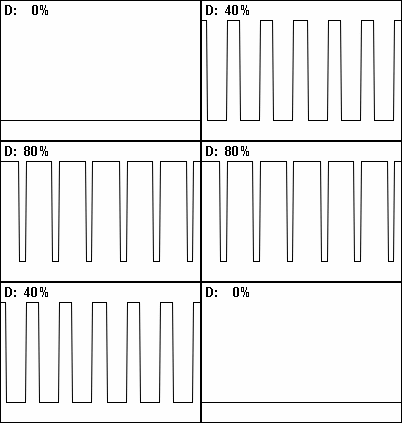
Pulse width modulation
Waveforms with unequal low and high times () are desired.
Duty Cycle: fraction of time in a period that a waveform is active (e.g. high)
Commonly expresses as percentage rather than a simple ratio:
https://en.wikipedia.org/wiki/Duty_cycle:
Pulse Width Modulation and Frequency Modulation
In-class
Drawings
-
Frequency Modulation
- Reference
- Output
-
Pulse Width Modulation (Duty Cycle Modification)
- Period Stays the same
- Reference
- Output

-
PWM
- PWM Output
- Filtered Output


- Note, (explicit) electronic filtering is not always necessary, sometimes it happens elsewhere in a system
- When we "see" a fast flashing LED we only perceive the recent average intensity, which is related to the duty cycle. A DC motor will respond the recent average supply level. PWM is also the basis of switching power supplies used in computers. By monitoring the output level using an ADC, the digital system can respond to load changes modifying the duty cycle.
Fast PWM
- Clears/sets value when hits compare register
- Sets/clears value when on overflow

Phase Correct PWM Mode
-
Phase correct PWM modes are like standard PWM modes but the center of the pulse does not change spacing when pulse width changes

-
On AVR, this is achieved by a special “dual slope” counter behavior
- The counter counts repeatedly from BOTTOM (0x0000) to TOP and then from TOP to BOTTOM
-
Clears/sets on compare match on up slope
-
Sets/clears on compare match on down slope

AVR 16-Bit Timers
- Similar to 8-bit timers
- Note all 16-bit reads and writes involve a high-byte buffer
- If using 8-bit access, read low byte first and write it last
- If using 16-bit register names, C compiler will take care of the order
Timer Counter 0 and 1
• Share the same prescaler but have separate selection

Timer/Counter 1 Modes:
-
Modes are similar to T/C 0, but use dual-purpose Input
Capture Register/Count Top Register (ICR) -
In PWM modes
- ICR controls frequency
- OCR and ICR together control pulse width
-
At event (Counter=ICR) , sets Output High
-
At event (Counter==OCR), sets Output Low and T/C Reset

Counter Modes Summary
AVR timers has a few important modes of operation:
- Non-PWM Modes
- Normal Mode - count and reset at overflow, setting overflow
flag - Compare Timer Clear (CTC) Mode - reset upon reaching
comparison value
- Normal Mode - count and reset at overflow, setting overflow
- PWM Modes
- Fast PWM - beginning of pulses are regularly spaced
- Phase Correct PWM - center of pulses regularly spaced
Hardware Buffering for Multi-word Software-Hardware Read and Writes
-
There is a general problem when multiple-word-access is involved when accessing hardware that can change while being accessed.
-
Consider reading a 16-bit timer like this:
- Timer value is 0x00FF
- Upper Byte is read as 0x00
- Meanwhile timer increments to 0x0100
- Lower Byte is read as 0x00
- Result used by software is 0x0000
-
Consider writing a 16-bit countdown timer with value 0x0102 like this
- Timer value is 0x0200
- Write 0x01 to upper
- Timer decrements to 0x00FF
- Write 0x02 to lower
- Timer is now at 0x0002
-
A solution is to provide automatic hardware buffering for simultaneous read and simultaneous writes
- From software perspective, required to access registers in a specified order.
- In 8-bit AVR C
- Write -- HIGH register then LOW register
- Read -- LOW register then HIGH register
- The C compiler takes care of reading/writing the bytes of a 16-bit register in the correct order.
Only write to lower triggers write to peripheral registers, upper byte is buffered to a buffer register and should be written first

Reading lower byte triggers upper-byte to be copied to buffer registers. Second read of upper byte is actually from the buffer register.

Hybird Hardare-Software Timers
The functionality of software and hardware can be combined for increased utility from timers
Extending Timer Through Software Using Overflow Bit
The effecter timer/counter range may be extended using software.
Timer/counters typically have overflow bits.
- Can be used to double the range of the counter for one go-through, though it doesn't roll-over to zero automatically like other bits
- Can be used with software that counts count timer/counter overflows
- Total count = #overflows*(max count + 1) + counter register
- If using interrupt, interrupt hardware must reset overflow flag before the next
counter/timer register roller over - If using polling, software must check and clear overflow flag least once per
timer/counter rollover period
Example: count 10.5 *max counter
- Configure interupt on overflow, and compare-match to 0.5 max counter value
- Start counter, set TC = 0
- Counter overflows (overflow bit set)
- Software detects overflow or ISR is used
- Software resets overflow flag
- Software increments overflow count
- When Software counts 10 overflows, ISR for compare register is used next
- Counter hits ½ max, interrupt occurs to end the timed sequence

(Thanks Alex Nelson for providing overflow Example)
System Tick and Software Timers
- Using one slow hardware clock (taking advantage of precision and size of timer registers) with multiple derived software timers
- In a complex-software application, several events may require timing but may not require much precision (perhaps on the order of 1 ms or 10s of ms)
- A common technique is to have an ISR triggered at some interval by the compare-match or timer overflow events that keeps track of time passage with a static variable and maintains many software timers that may be reset, may timed , or be otherwise controlled purely through software.

- By maintaining a single software count, "ticks", many derivative timers can be built in software
- Limited to the time resolution of the tick period
Multiple Hybrid Hardware/Software timers with dynamic updates for next event
- in this approach, software updates the "trip value" on each call
- "tick" based timers have low-precision, software can augment timers in another way with dynamic updates
- Consider the need for reaction required at times
- 50us 70us 100us 125us 500us
- Approach with dynamic updates to compare register
- Set Timer for 1 MHz
- Setup Compare-Match ISR and Register for Request @ TC==50
- In that ISR call, setup Request @ TC==70 and do the immediately required work
- In the ISR call at TC=70, setup Request @ TC==100 and do the immediately required work
- and so on....
- This technique allows use of a hardware timer to implement many well-timed responses
ACHIEVABLE hardware timing
Getting the frequency you want can require some thought.
- Resulting frequency = input clock / prescaler / (max count+1)
- Max count may be defined by a compare register or the maximum value of the counter (2^N-1)
- Clock division = prescaler * (max count+1)
- You must choose the prescaler and max count to get the clock scaling you want
- but prescaler is typically limited to a few select values (such as powers of two)
- Based on the application, choose undershoot, overshoot, or min-error depending on the application
Example:
- Input (system) clock is 1 Mhz and you need a 3 kHz period from an 8-bit timer
- Assume your prescalers can divide by powers of two.
- Generally, to get the most precision, you should choose the smallest prescaler possible as use the compare register for the rest, unless the division factor is a factor of two.
- Here, we want division factor of 1M/3k = 333.3333....
- Simply setting the compare register to 333 can't be done (8 bit)
- Option 1: prescaler=2 , compare register = (333.33../2-1) = 167-1
- resulting period is 1M/167=2994 Hz
- Option 2: prescaler=4 and a max count of 83-1
- resulting period is 3012 Hz
- Though the second option's error is larger, which error is better (small freq. overshoot or larger freq. undershoot) is application-dependent
Base derivative calculations on the Actual/Achieved Frequency, not the Desired Frequency
- Use actual resulting timer periods, not the ones you wanted
- If you try to create a 3000 Hz clock but instead get 2994 Hz through your configuration, use 2994 for all derived
calculations instead of 100. For instance to wait 2 seconds, you should wait 2994*2 cycles not 6000
#define F_CPU = (1000000.0)
#define F_DESIRED = 3000
#define PRESCALER = 2
 //typically a power of two
#define F_PRESCALE = (F_CPU/PRESCALER)
 // gives value 500000
#define TIMER_COUNT = ceil((F_PRESCALE)/F_DESIRED)
 // find integer count: ceil -> slightly faster error
 // floor -> slightly slower error

#define TIMER_MAX_COUNT_TO_SET = (TIMER_COUNT-1) // define max count to set
// Find the achieved freq. on the next line 2994.012 Hz
#define F_ACTUAL = F_CPU/(PRESCALER *(TIMER_COUNT))
// Key point here: use F_ACTUAL not F_DESIRED
# define TEN_SECONDS = F_ACTUAL * 10
- Had the TWO_SECONDS been define with F_DESIRED, the time would overshoot and have been 10 * (3000/2994.012) seconds
- If floor was used and TEN_SECONDS was defined with F_DESIRED, the time would undershoot and have been 10*
(3000/3012.0482) seconds
"Leap Cycles for Leap Ticks" Slip Adjustment to Compensate for Error Accumulation
- May desire timing divisions that are non-integer
- Can approximate this by an occasional "Slip" to remove drift (error accumulation)
- For some leap ticks, count is modified, just as a day is added every leap year
- In the previous example, if 3012.0482 was used instead of 3000, and error could be compensated by waiting an extra clock period every 20 ticks
- Can extend idea one level deeper if software timers are based on available OS timer
- Example:
- Demand: Action every 100.001 ms
- Given: Timer function called every by ISR every 1ms
- Solution:
- Most events are invoked scheduled every 100 ticks (calls to timer response function)
- Error accumulation is -.001 ms on each call
- Make every 1000th call with count of 99 ticks
- Example: